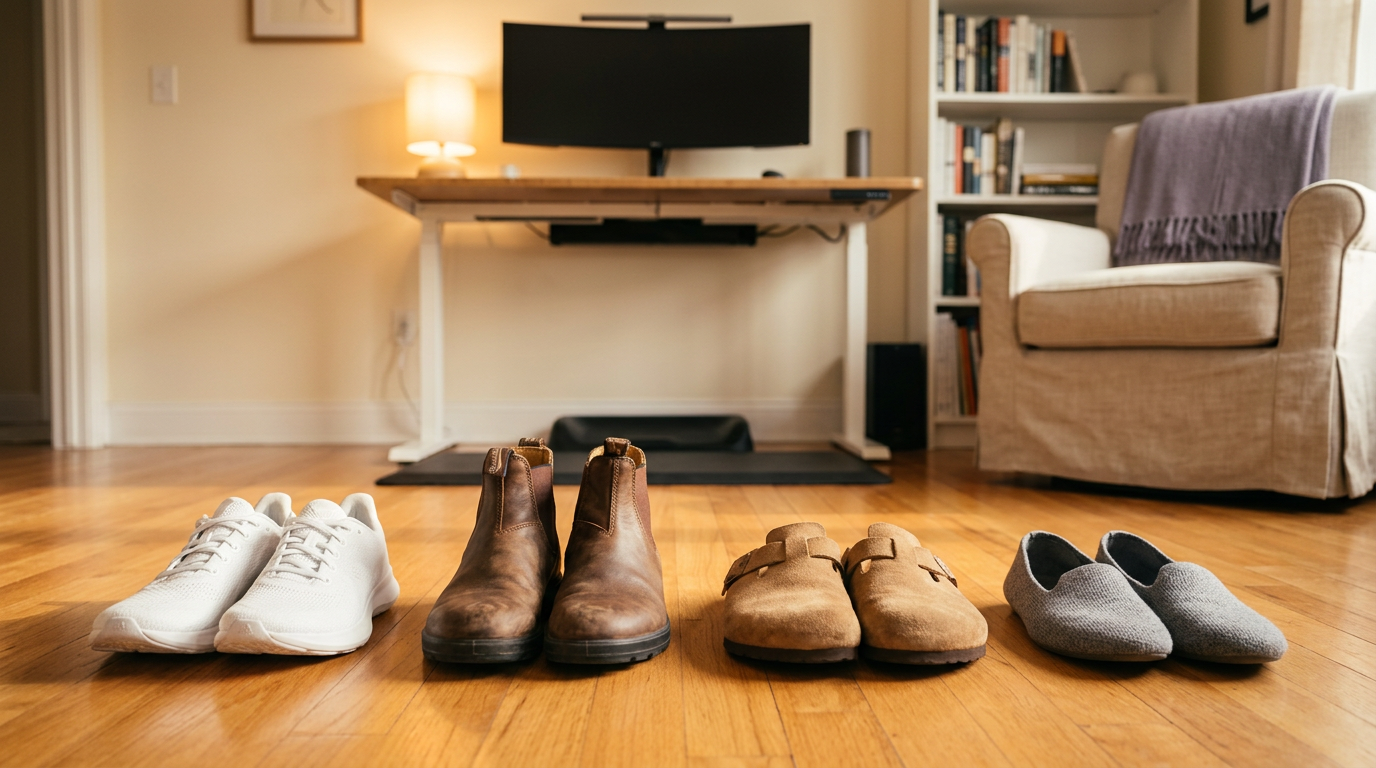
The standing desk solves the chair problem. Then it creates the shoe problem.
Most people upgrading to a standing desk do not think about footwear until their feet hurt. By then they have spent weeks blaming the desk height, the mat, or the transition period — when the real bottleneck is what is on their feet.
This page is the footwear decision framework. Not a product-by-product review — a category guide that helps you match shoe type to standing duration and surface.
The footwear spectrum for standing desks#
Tier 1: purpose-built comfort shoes (4+ hours)#
Cushioned trainers, walking shoes with rocker soles, and dedicated standing-work shoes. These have structured arch support, responsive midsoles, and forefoot cushioning that does not bottom out. If you stand more than four hours daily, this tier is the only one that holds up without supplemental fixes.
Best for: long standing sessions, hard surfaces, people who have already tried boots and given up.
Tier 2: fashion boots with insole upgrade (2–4 hours)#
Dr. Martens, Blundstones, Red Wings, Timberlands, Chelsea boots. The stock footbeds are flat and minimal, but most accept aftermarket insoles well. With a medium-arch orthotic and an anti-fatigue mat, these are viable for moderate standing durations.
Best for: people who want to look good on camera or in the office and are willing to invest in the insole-plus-mat stack.
See Are Dr. Martens Good for Standing All Day? and Blundstones at a Standing Desk for the specific fix guides.
Tier 3: cork-bed sandals (2–4 hours, warm weather)#
Birkenstock-style cork footbeds provide natural arch support and distribute weight well. The open design keeps feet cool during long sessions. The tradeoff is less heel retention and no ankle support, so they work best on mat surfaces where foot slip is not a concern.
Best for: home offices, warm climates, people who want arch support without full shoe enclosure.
Tier 4: flat slippers and barefoot (not recommended)#
Flat slippers compress under body weight and provide zero arch support. Barefoot standing on flat surfaces concentrates load on heel and forefoot. Both work against you during any session longer than 30 minutes.
If you prefer the barefoot feel, use a contoured anti-fatigue mat that provides terrain variety — the mat replaces the shoe’s job of distributing pressure.
The universal fix stack#
Regardless of what is on your feet, two additions improve standing comfort across every footwear tier:
1. Insole upgrade. Remove the factory insole from any closed shoe and replace with a medium-arch work orthotic. This is the single highest-impact change for standing desk comfort.
As an Amazon Associate I earn from qualifying purchases.
CRUVHEAL Work Orthotic Insoles Amazon ↗(read review) work across boots, trainers, and casual shoes. Deep heel cup, structured arch, shock-absorbing forefoot pad — built for all-day standing on hard surfaces.
2. Anti-fatigue mat. Handles what the insole cannot — the hardness of the floor itself. A contoured mat encourages micro-movements that prevent the static-load fatigue that builds regardless of footwear.
For the full breakdown, see Anti-Fatigue Mat vs Insoles.
How to choose#
- Standing under 2 hours/day: any comfortable shoe is fine. Skip the optimization.
- 2–4 hours: boots or casual shoes with an insole swap. Add a mat if on hard floors.
- 4+ hours: purpose-built comfort shoes. Insoles and mats are still worth adding.
- All day: rotate between two pairs. Alternating support profiles reduces repetitive load.
