
If you work from hotels long enough, you stop trusting the Wi-Fi.
Travel routers solve a boring but expensive problem: unstable logins, weak security, device limits, and the friction of reconnecting everything every time you change rooms or properties. The right one gives you a private network you control, even when the building network is mediocre.
This page is the comparison version of the narrower Ask Mira answer: What Travel Router Should I Carry for Remote Work in Hotels?. The question page helps you decide if you need one. This guide is where the actual buying call gets made.
As an Amazon Associate I earn from qualifying purchases.
Quick Picks#

GL.iNet Beryl AX (GL-MT3000)
AX3000-class Wi-Fi 6 pocket travel router with a 2.5Gbps WAN port, WireGuard/OpenVPN and Tailscale support, and OpenWrt-based firmware — built for carrying a trusted, VPN-tunneled network on the road.
- Best for: most remote workers who want one bag-friendly router that just works
- Why it stands out: compact, VPN-friendly, easy to keep in a travel pouch
- Tradeoff: less headroom for heavier multi-device or more demanding setups
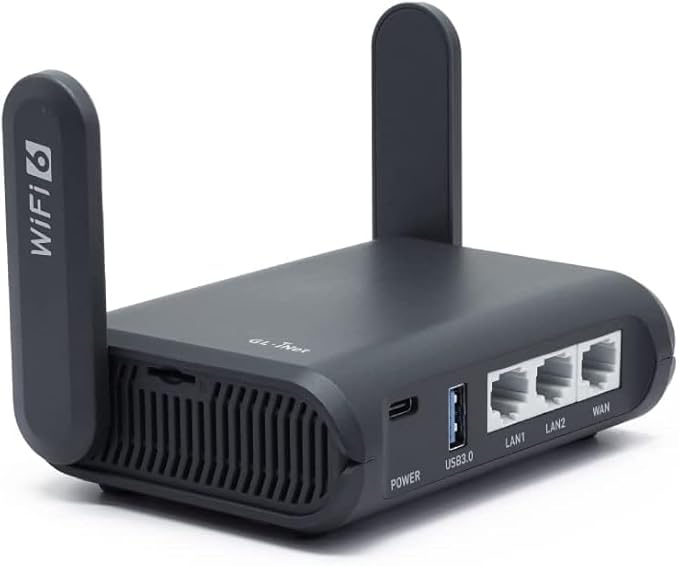
GL.iNet Slate AX (GL-AXT1800)
AX1800-class Wi-Fi 6 travel router with three Gigabit ports, a microSD slot, and Qualcomm-powered WireGuard throughput up to 550 Mbps — the wired-friendly, higher-VPN-ceiling sibling to the Beryl AX.
- Best for: travelers who want more bandwidth headroom and a stronger long-term travel setup
- Why it stands out: more capable for denser device loads and tougher hotel setups
- Tradeoff: bigger footprint and usually more router than casual travelers need
What Actually Matters in a Travel Router#
- WISP or repeater mode that behaves cleanly with hotel captive portals
- Easy WireGuard or VPN client setup before you leave home
- USB-C or simple power options that fit the rest of your bag
- Stable enough performance that all your devices can stay on one SSID all trip
Who Should Actually Buy One#
You probably need a travel router if:
- you work from hotels more than a few times a year
- you bring a laptop, phone, tablet, and maybe a streaming stick or portable monitor
- you do client calls on building Wi-Fi you do not control
- you want your devices behind your own network instead of reconnecting each one to hotel login pages
You probably do not need one if:
- you rarely work away from home
- you only travel with one laptop and hotspot from your phone
- you are trying to keep the bag absolutely minimal
Beryl AX vs Slate AX#
The Beryl AX is the cleaner first buy for most remote workers. It is smaller, easier to justify in a tech pouch, and still has the travel-router features that matter: Wi-Fi 6, OpenWrt-based firmware, VPN client support, repeater/WISP mode, USB-C power, and Ethernet fallback. GL.iNet lists it as an AX3000 router with 574 Mbps on 2.4GHz and 2402 Mbps on 5GHz, a 2.5G WAN port, a 1G LAN port, USB 3.0, 512MB RAM, and 256MB flash.
The Slate AX is the more capable bag router when you expect heavier sessions. GL.iNet lists it as an AX1800 router with 600 Mbps on 2.4GHz and 1200 Mbps on 5GHz, OpenVPN speed up to 500 Mbps with DCO support, WireGuard up to 550 Mbps, OpenWrt 21.02 support, DFS, and file sharing. Its advantage is not that everyone needs the extra router. Its advantage is that it leaves more headroom when the trip turns into a real work setup instead of one laptop in one room.
The practical split:
- Buy the Beryl AX if you want the smallest reliable answer for hotel rooms, Airbnbs, coworking days, and one-person remote work.
- Buy the Slate AX if you travel with more devices, run heavier VPN sessions, share the connection, or want the router to feel less like a minimal travel accessory and more like a portable network hub.
For most people, Beryl AX first. Slate AX only if you already know why the extra headroom matters.
Hotel Wi-Fi vs Airbnb Wi-Fi#
Hotels and Airbnbs fail differently.
Hotel Wi-Fi is usually the captive-portal problem. You connect, accept terms, maybe enter a room number, and hope every device behaves. A travel router helps because it can authenticate once, then let your devices connect to your private SSID. That means your laptop, phone, tablet, streaming stick, and portable monitor adapter stay on the same network across the trip instead of each fighting the property login page.
Airbnb Wi-Fi is usually the trust and consistency problem. You may get a normal router with a normal password, but you do not control the firmware, guest network, owner access, or how many previous guests have used the same credentials. A travel router gives your devices their own layer and lets you run a VPN profile at the router level instead of remembering to start VPN apps one by one.
The move is the same in both places: connect the travel router to whatever internet the property gives you, then keep your devices on your own SSID. You are not making bad upstream bandwidth good. You are making an unfamiliar network less annoying and less exposed.
Pre-Trip Setup Guide#
Do the setup at home. Not in the hotel room. Not in the airport lounge. Not ten minutes before a client call.
- Update the router firmware.
- Change the admin password.
- Create a private SSID and password you will reuse on trips.
- Add your WireGuard or OpenVPN profile.
- Test VPN autoconnect.
- Test Ethernet-in if you have an adapter or room jack available.
- Test WISP/repeater mode against your home Wi-Fi so the captive-portal workflow feels familiar.
- Label the router, cable, and charger so they do not disappear into the bag.
The reason this matters is boring: travel is already a stack of small failures. If the router is configured before you leave, hotel setup becomes a two-minute ritual instead of a troubleshooting session.
Travel Connectivity Pouch#
The router is only one piece of the kit. The full pouch should solve power, Ethernet, fallback internet, and cable weirdness without making the bag feel like a drawer.
Pack this:
- Travel router: Beryl AX for most trips, Slate AX for heavier setups.
- Short USB-C power cable: short enough that it does not tangle with the desk.
- 20W or stronger USB-C wall charger: enough to power the router without stealing your laptop brick.
- Flat Ethernet cable: useful in hotels, conference rooms, and older Airbnbs with a working wall jack.
- USB-C Ethernet adapter: for laptops that need a wired fallback.
- Tiny label or card with the router admin URL and private SSID: not the password, just the setup reminder.
- Backup SIM/hotspot plan if the trip is work-critical.
Keep the pouch boring and repeatable. The best travel kit is the one you do not have to think about when the room is bad, the clock is loud, and the call starts in nine minutes.
Final Call#
Most remote workers should buy the GL.iNet Beryl AX (GL-MT3000) Amazon ↗(read review) first. It is the right balance of small, capable, and easy to keep packed. Buy the GL.iNet Slate AX (GL-AXT1800) Amazon ↗(read review) if travel networking is part of your actual work system and you want more VPN and device headroom.
Either way, the win is not raw speed. The win is walking into a hotel or Airbnb and making the network feel like yours.
Sources checked for specs: GL.iNet Beryl AX product page, GL.iNet Beryl AX datasheet, GL.iNet Slate AX product page, and GL.iNet Slate AX datasheet.