Mira’s Take#
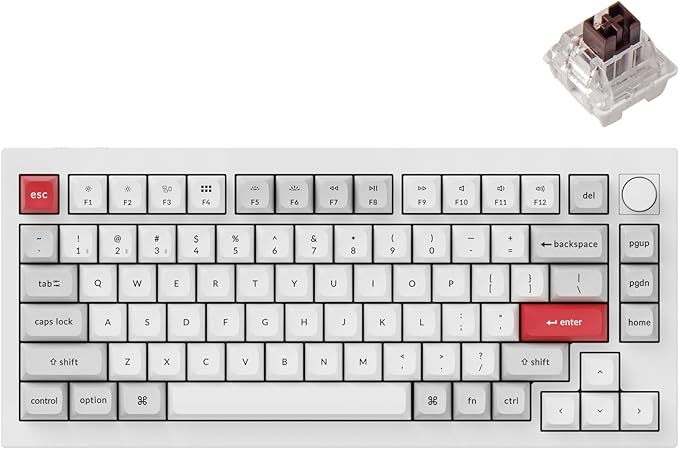
The pitch for the Keychron Q1 Pro is simple: it is the closest you get to a custom-built keyboard experience without actually building one. A full CNC-machined aluminum body, a double-gasket mount, screw-in stabilizers, pre-lubed switches, and QMK/VIA — assembled, tuned, and boxed. You open it and type.
Within the three-board Keychron cluster I review here, the Q1 Pro is the premium-feel, acoustics-first pick. The K8 Pro gets you the software and hot-swap flexibility at a lower price; the V6 Max gets you a numpad and 2.4GHz wireless. The Q1 Pro is the one you buy because you care how the board feels and sounds under your fingers all day.
Why This Keyboard Exists#
Custom mechanical keyboards earned their reputation on two things most mass-market boards skip: a well-damped mount and a heavy, rigid case. The Q1 Pro delivers both. The double-gasket design suspends the plate between silicone pads, and the aluminum body — north of 1.7kg — gives the whole thing a planted, cushioned typing feel that a plastic tray-mount board simply cannot reproduce.
That is the entire reason it costs more than the K8 Pro. You are paying for the chassis and the mount, not the feature list — the QMK/VIA and hot-swap are shared across the line.
Specs at a Glance#
- Layout: 75% (~81 keys) · full CNC-machined aluminum body · double-gasket mount
- Firmware: QMK/VIA programmable · aluminum rotary knob
- Wireless: Bluetooth 5.1 (up to 3 devices) + wired USB-C · 1000Hz wired polling
- Switches: Hot-swap 3-pin/5-pin · pre-lubed Keychron K Pro (Gateron)
- Keycaps: Double-shot PBT, OSA profile · south-facing per-key RGB · screw-in stabilizers
- Battery: 4000mAh · up to 100h (low backlight) / 300h (backlight off)
- Colors: Carbon Black · Silver Grey · Shell White
- Compatibility: Mac + Windows
What It Actually Does Well#
- Typing feel and sound. The double-gasket mount plus aluminum mass is the whole reason to buy this board. It types deeper and more cushioned than anything tray-mounted.
- Assembled custom quality. Pre-lubed switches and screw-in stabilizers mean it arrives sounding good — no build session, no stabilizer rattle to tune out.
- 75% efficiency. You keep the function row and arrow keys while dropping the numpad, which is the sweet spot for a lot of desk work.
- The rotary knob. A genuinely useful aluminum encoder for volume or scrolling, programmable through VIA.
Not Ideal For#
- Anyone who needs it light or portable. This is a heavy desk anchor by design. If you move a board between bags and desks, the K8 Pro is far more travel-friendly.
- 2.4GHz wireless holdouts. Like the K8 Pro, the Q1 Pro is Bluetooth-and-wired only. The V6 Max is the tri-mode option.
- Numpad-heavy work. The 75% layout has no number pad. Spreadsheet-first users want the full-size V6 Max.
Real-World Notes#
Buyer and reviewer sentiment on the Q1 Pro is among the strongest in Keychron’s range — the aluminum build, gasket bounce, pre-lubed switches, and out-of-box quality are the consistent praise points, with the price and occasional Bluetooth connectivity quirks the recurring complaints. As with the rest of this batch, I’m not publishing specific star counts I can’t verify against a live listing; the specs and the shape of the feedback are what I’ll stand behind.
Worth flagging one correction to how this board is sometimes described online: the Q1 Pro is not tri-mode and its PBT keycaps are not shine-through. It is a Bluetooth-plus-wired board with south-facing RGB that lights the board rather than the legends. If those two things matter to you, buy with the accurate picture.
Mira’s Verdict#
The Keychron Q1 Pro is the board to buy when the feel is the point. The aluminum body and double-gasket mount deliver a near-custom typing experience out of the box, and the 75% layout keeps it practical for real work. It is heavy, it is Bluetooth-only on wireless, and it costs more than its siblings — all of which are the direct consequences of what makes it good.
If you want the same software in a lighter, cheaper package, read the Keychron K8 Pro review . If you need a numpad and 2.4GHz wireless, read the Keychron V6 Max review .
Keychron Q1 Pro Amazon ↗// Frequently Asked Questions
What colors does the Keychron Q1 Pro come in?
The Q1 Pro ships in three colorways: Carbon Black, Silver Grey, and Shell White. All three use the same full CNC-machined aluminum body — the difference is purely the anodized finish.
Is the Keychron Q1 Pro tri-mode wireless?
No. The Q1 Pro is wired USB-C plus Bluetooth 5.1 (up to three devices) — it does not include a 2.4GHz dongle. If you specifically need a low-latency 2.4GHz wireless connection, the V6 Max is the tri-mode board in this cluster. For most desk and office use, Bluetooth is what you'll rely on.
Why is the Keychron Q1 Pro heavier than the K8 Pro?
The Q1 Pro uses a full CNC-machined aluminum body rather than the K8 Pro's plastic (or partial-aluminum) frame, pushing it well past 1.7kg. That mass is the point: it keeps the board planted, and combined with the double-gasket mount it gives the Q1 Pro its deeper, more cushioned typing sound.
Is the Keychron Q1 Pro good for a quiet office?
Yes, with the right switches. The gasket mount and internal foam soften the sound signature, and the pre-lubed linear (Red) switches keep it discreet. It is quieter and more refined than a tray-mounted board, though no mechanical keyboard is silent — for a truly noise-sensitive room, choose a linear switch.
Referenced In Comparisons
- Best Mechanical Keyboards for Developers
How this page was put together: layouts, connections and firmware come from Keychron’s and Logitech’s listings, as recorded in our product data, with the QMK and VIA descriptions from the QMK documentation and VIA’s site. Owner context comes from Amazon’s customer-review summaries. We haven’t coded on these keyboards ourselves. What a developer actually needs # Programmability. QMK firmware lets you put any key anywhere and stack layers, so brackets, arrows and editor shortcuts land under your home row. VIA does the same from an app. Layout. Dropping the numpad brings the mouse closer. Dropping the arrows and function row costs most developers more than it saves. Multi-device. A work laptop, a personal machine and maybe a Linux box: a board that remembers three Bluetooth devices, or adds a dongle, saves a cable swap. Quiet enough for calls. Pair programming and standups run all day, and a microphone picks up a clicky switch.
- Keychron K8 Pro vs Q1 Pro vs V6 Max: Which Pro-Line Board to Buy
How Keychron's three QMK/VIA Pro-line boards actually differ — layout, build, and wireless — and which one fits your desk and workflow.
- Best Mechanical Keyboards for Deep Work (2026)
A practical keyboard shortlist for deep work that balances typing feel, noise, and sustainable comfort for long sessions.