Mira’s Take#
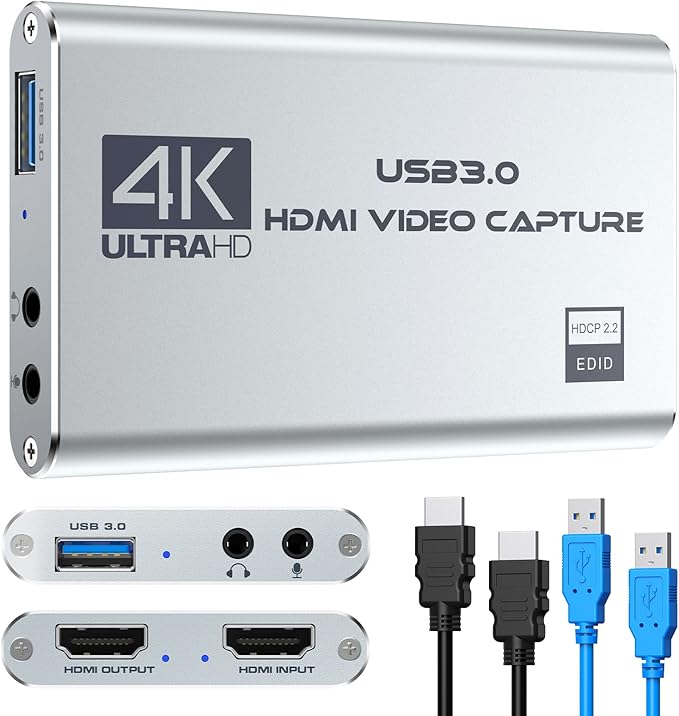
The Rybozen 4K 1080p 60FPS HDMI Video Capture Card is the budget answer when the question is not “what is the nicest capture card?” but “can I get a console or camera signal into OBS without blowing the whole streaming budget?”
That is a real lane. A spooky-cozy stream setup does not need a broadcast cart. It needs a clean enough bridge between an external HDMI source and the computer, preferably one that does not turn the desk into a nest of adapters.
This card is attractive because the captured Amazon data puts it at $28.99, with 4.3 stars from 2,119 ratings, 1080p60 recording language, USB 3.0, plug-and-play detection, and HDMI loop-out. Those are the right starter signals for console streaming, Switch nights, casual PS5/Xbox capture, or a first camera-input experiment.
The caveat is just as important: this is the cheap lane. Buy it because the job is simple and the budget is tight, not because you expect premium capture-card polish.
The supplied buyer reviews mostly support that framing. People repeatedly call out easy OBS detection, no-driver setup, cool operation, and strong value for Switch, PS5, and quick tutorial capture. The friction points are also exactly where a $29 card can show its class: no HDR passthrough, possible freezing unless the capture resolution is lowered, HDMI ports that may not feel as snug as premium hardware, and at least one buyer who could not push the stream past 1080p50.
Why Mira Flagged It#
- The supplied product data lists 1080p 60fps recording.
- HDMI loop-out is listed, which matters for console play while OBS captures the feed.
- USB 3.0 and plug-and-play setup are listed, with no driver or external power required.
- The listing calls out Windows and Mac support plus OBS, QuickTime Player, Twitch, YouTube, Facebook, PotPlayer, and VLC use.
- A 3.5mm TRS mic input is listed for commentary, though I would still keep primary voice audio on a dedicated USB/XLR mic when possible.
- Captured Amazon data showed $28.99, in stock, and 4.3 stars from 2,119 ratings on May 8, 2026.
- Supplied buyer reviews mention fast setup in OBS, cool operation, no noticeable lag for some console use, and good beginner value.
Best For#
- Beginner console streamers trying to keep the capture-card spend very low.
- Nintendo Switch, older console, or casual living-room streaming setups.
- Creators testing whether HDMI capture belongs in the workflow before buying a higher-end card.
- Small rooms where a tiny capture box is easier to live with than a larger desk setup.
Not Ideal For#
- Buyers who want a premium, long-term capture card for frequent paid work.
- 4K-first streamers who care about high-end HDR, VRR, or high-frame-rate passthrough.
- Competitive players who should be very picky about latency and display-chain behavior.
- Anyone expecting the support experience and software ecosystem of a larger capture-card brand.
- HDR passthrough setups or high-refresh 4K displays where the capture card must disappear in the chain.
Real-World Use#
For a small streaming corner, this is plumbing. HDMI source in, USB to the computer, loop-out to the display if you are playing on a TV or monitor, then OBS sees a video source.
That simple role is why the price matters. If you are hosting a horror night, capturing a console, and checking signal with a five-second test recording before going live, a starter card can be enough. The clean move is to spend saved money on the parts viewers notice immediately: clear audio, a stable scene, and lighting that does not flatten the room.
The main buyer discipline is expectation control. Use this for 1080p starter capture. If your setup needs HDR polish, modern console passthrough features, or a more brand-backed workflow, step up.
If the image freezes, the most useful buyer-reported fix is boring but practical: lower the capture resolution and test again before blaming OBS. I would also avoid using this as a permanent high-refresh display bridge. Treat the loop-out as a convenience for casual console streaming, not as proof that it belongs in a demanding 4K120 or HDR gaming chain.
Alternatives Worth Considering#
- Elgato Cam Link 4K if the source is a DSLR, mirrorless camera, camcorder, or action camera and you do not need HDMI passthrough.
- A higher-end Elgato game capture card if you need more advanced passthrough, HDR, VRR, or high-frame-rate support.
- Software capture if the game or video source is already running on the same computer.
Mira’s Verdict#
The Rybozen 4K 1080p 60FPS HDMI Video Capture Card is the cheap, practical starter pick for budget streamers who need HDMI into OBS more than they need a prestige box on the desk.
Buy it for simple 1080p console or camera experiments with HDMI loop-out. Skip it if the capture card is becoming the core of a serious gaming setup, especially one built around HDR or high-refresh 4K play.
For the setup decision before you buy anything, read Do I Need a Capture Card for Streaming?.
// Frequently Asked Questions
Is the Rybozen capture card good enough for beginner streaming?
It is a reasonable starter-class pick when you need inexpensive HDMI capture for OBS and 1080p60 capture is enough. The captured Amazon listing shows 4.3 stars from 2,119 ratings at $28.99 on May 8, 2026.
Does the Rybozen capture card have HDMI loop-out?
Yes. The supplied Amazon product data lists HDMI loop-out, which is the feature to look for if you want to play on a separate display while sending the feed to OBS.
Is this the right capture card for 4K streaming?
No. Treat it as a budget 1080p capture device. The product data says video input supports higher formats, but capture is positioned around 1080p.
Related Ask Mira
- Do I Need a Capture Card for Streaming?
You need a capture card only when an external video source has to enter the computer cleanly.
Related Reviews
- Elgato Cam Link 4K
A compact HDMI-to-USB capture adapter for creators who want to turn a compatible camera, camcorder, action cam, or iPhone feed into a cleaner webcam source.
- Elgato Facecam MK.2
A strong fixed-shot webcam for streamers and creators who already have decent lighting and want cleaner control than the average monitor-top camera offers.