Best Mechanical Keyboards for Developers

A developer's keyboard has a job the spec sheet rarely names: put brackets, arrows and shortcuts where your hands already are, and stay that way across every machine you code on. That makes programmability the first filter, and layout the second. Three of these four run QMK firmware, so any key can be remapped and layered. The fourth is the pick for people who would rather not touch firmware at all.
As an Amazon Associate I earn from qualifying purchases. Prices aren't shown — tap through to check the current price on Amazon.
At a glance
How this page was put together: layouts, connections and firmware come from Keychron’s and Logitech’s listings, as recorded in our product data, with the QMK and VIA descriptions from the QMK documentation and VIA’s site. Owner context comes from Amazon’s customer-review summaries. We haven’t coded on these keyboards ourselves.
What a developer actually needs#
- Programmability. QMK firmware lets you put any key anywhere and stack layers, so brackets, arrows and editor shortcuts land under your home row. VIA does the same from an app.
- Layout. Dropping the numpad brings the mouse closer. Dropping the arrows and function row costs most developers more than it saves.
- Multi-device. A work laptop, a personal machine and maybe a Linux box: a board that remembers three Bluetooth devices, or adds a dongle, saves a cable swap.
- Quiet enough for calls. Pair programming and standups run all day, and a microphone picks up a clicky switch.
Keychron Q1 Pro
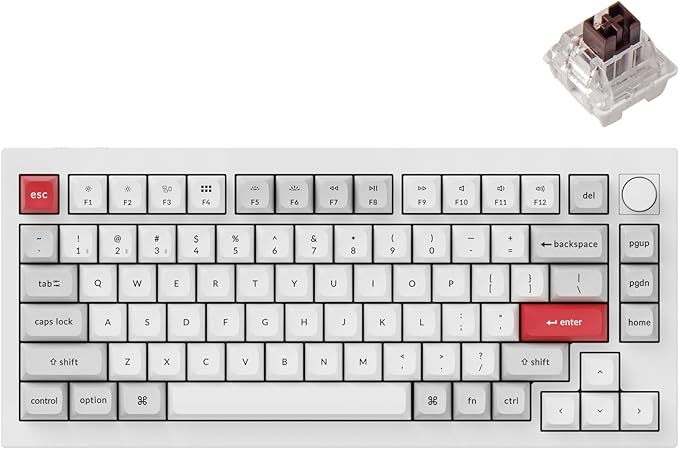
The 75% layout keeps the arrow keys and a function row, drops the numpad, and brings the mouse closer. QMK/VIA comes out of the box, so you can remap any key and move brackets or arrows onto a layer. It's a full CNC-aluminum body with a double-gasket mount, and the hot-swap sockets take new switches without soldering. It's the one I'd pick for a desk you code at every day.
- QMK/VIA programmable, per Keychron
- 75% layout keeps arrows and the function row
- Wired USB-C plus Bluetooth 5.1 to three devices
- Hot-swappable 3-pin and 5-pin sockets
- No 2.4 GHz dongle; wireless is Bluetooth only
- Heavy: the aluminum body is built to stay put, not to travel
- Keychron lists Mac and Windows, not Linux
Keychron K8 Max

The successor to the K8 Pro. A tenkeyless layout is the gentlest move from a full-size board: every key a developer expects except the numpad, in its usual place. Keychron lists QMK with its Launcher web app for remapping, and three ways to connect: 2.4 GHz, Bluetooth 5.1 to three devices, and USB-C. Keychron lists Mac, Windows and Linux support, which suits a work laptop, a personal machine and a Linux box on one desk.
- QMK, remapped through Keychron Launcher
- 2.4 GHz, Bluetooth and wired, with NKRO wired and wireless
- Mac, Windows and Linux, per Keychron
- Hot-swap only on the hot-swappable versions; check the listing
- Bluetooth polls at 90 Hz against 1000 Hz on the dongle or cable
Keychron V6 Max

The pick if you enter numbers, work in spreadsheets next to the code, or just don't want to give up the numpad. It's a full 108-key board with QMK/VIA, a rotary knob and tri-mode wireless. Keychron credits its gasket mount and foam with a softer sound, though the stock switches are not silent ones.
- QMK/VIA programmable, plus a rotary knob
- 2.4 GHz at 1000 Hz, Bluetooth and wired
- Gasket mount and sound-absorbing foam, per Keychron
- Widest board here; pushes the mouse further out
- Some Amazon owners report bugs and Bluetooth drops
Logitech MX Mechanical
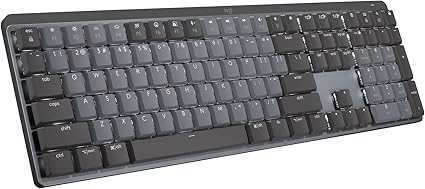
Not a QMK board, and that is the reason to pick it. It's a full-size, low-profile mechanical keyboard that pairs with three devices over Bluetooth or Logitech's Bolt receiver, with Tactile Quiet switches on this listing. It suits a developer who wants a better-feeling keyboard than a laptop's and no layer to learn. Owners are split on noise, so it's quieter than a clicky board, not silent.
- Low profile, close to a laptop's height
- Three devices over Bluetooth or the Bolt receiver
- Up to 15 days per charge, or 10 months with the backlight off, per the listing
- No QMK or VIA
- Amazon owner reports on noise are evenly split
// Frequently Asked Questions
Is QMK or VIA worth it for programming?
If you reach for brackets, arrows or the same shortcuts all day, yes. QMK firmware lets you remap any key and add layers, so those keys sit under your home row. VIA lets you make the same changes in an app without compiling firmware.
What keyboard layout is best for programming?
A 75% or tenkeyless layout suits most developers: arrows and the function row stay, the numpad goes, and the mouse sits closer. Keep the full-size layout if you use the numpad daily.
Are mechanical keyboards too loud for video calls?
Clicky switches usually are. Linear switches and a gasket-mounted, foam-filled case are quieter, but not silent. If your days are mostly calls, see our silent keyboard picks.
Do these keyboards work with Linux?
Keychron lists Linux support for the K8 Max and V6 Max. For the Q1 Pro it lists Mac and Windows; QMK keyboards generally work as standard USB keyboards on Linux, but that isn't a listed spec.
Related Comparisons
- Keychron K8 Pro vs Q1 Pro vs V6 Max: Which Pro-Line Board to Buy
How Keychron's three QMK/VIA Pro-line boards actually differ — layout, build, and wireless — and which one fits your desk and workflow.